
Indexes are the backbone of search engines. If your content isn’t indexed, it can’t show up in Google search results — no matter how valuable it is. But how do you know Google indexed your content correctly — especially long or detailed pages? Below is a clear, up-to-date guide covering what indexing is, how to verify it, and advanced checking methods.
📌 What Indexing Really Means
Before we jump into techniques, let’s define indexing:
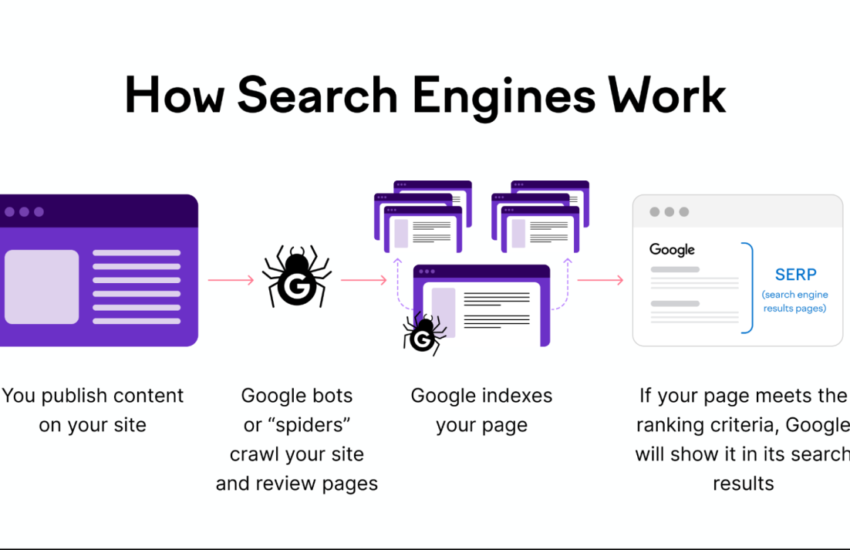
Indexing is the process where Google’s bots:
- Crawl your page (discover it),
- Render/Analyze the HTML, CSS, and JavaScript, and
- Add it to Google’s index so it can show in search results.
If a page isn’t indexed, Google won’t rank it — no matter how good the content is.
🔍 1. Check Indexing Using Search Operators (Quick Test)
The easiest first step — no tools required.
site:YOURURL
In Google Search, type:
site:yourwebsite.com/your-page-slug
If the page appears, it’s indexed. If nothing shows up, Google doesn’t currently include it in its index.
Tip: This is fast but not always precise — particularly for longer pages with many sections.
🛠 2. Use Google Search Console — Most Reliable Method
Google’s own tools give the best answers.
URL Inspection Tool
- Open Google Search Console and pick your property.
- Go to URL Inspection.
- Paste the full page URL.
- See the result:
- URL is on Google → indexed.
- URL isn’t on Google → not indexed.
This shows exactly how Google last viewed your page and whether the HTML was accepted into the index.
📊 3. Page Indexing Report (Bulk Overview)
If you want to check many pages at once:
- In Search Console go to Indexing > Pages.
- You’ll see:
- Indexed pages
- Pages not indexed
- Reasons why they aren’t indexed (e.g., noindex tags, crawl errors)
This is great for site-wide index health.
📖 4. Confirm Specific Content Passages
So what about long documents where you worry parts might not be indexed?
Google expert John Mueller recommends an easy trick:
🔎 Search for a distinct passage from deeper down the page (in quotes).
Example:
"this unique sentence from the middle of your article"
If this search result appears, then that part of the content is indexed and available to rank. It’s a simple and effective test to confirm indexing of specific content, not just the URL.
🧠 Why Some Pages Don’t Get Indexed
Even when crawled, Google may leave a page out of the index if:
- It’s marked noindex,
- It lacks internal links, or
- The content is low-value or duplicated.
Fix technical issues first (robots.txt, sitemap, meta tags) before asking Google to index again.
✔️ Best Practices to Boost Indexing Chances
✅ Submit your sitemap in Search Console
✅ Use internal links to important pages
✅ Ensure content is unique and valuable
✅ Use structured data where relevant
✅ Fix crawl issues reported in Search Console
These improve not only indexing, but ranking potential too.
📌 Final Thoughts
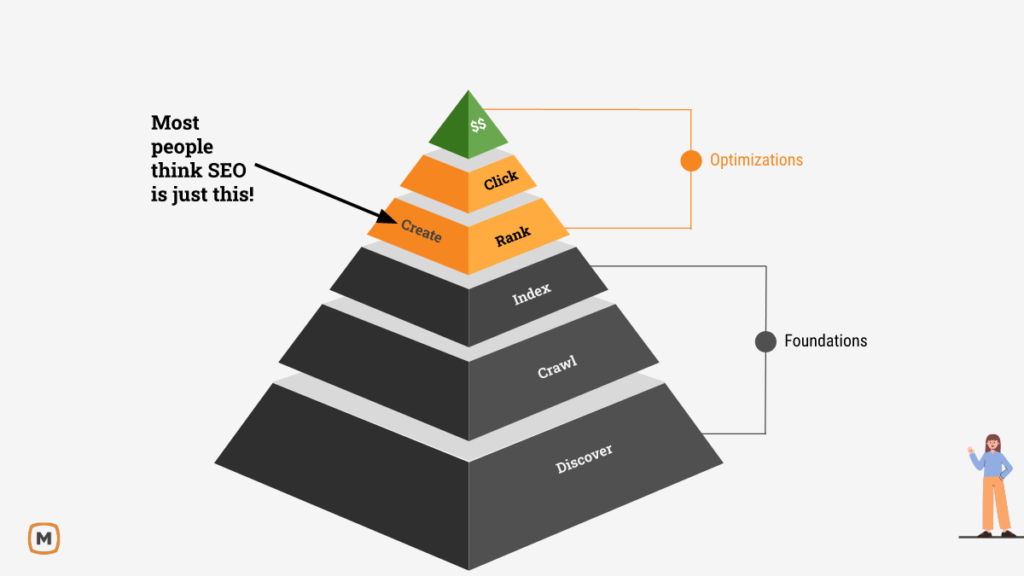
Indexing is the foundation of SEO. Knowing whether your entire document — especially long or complex pages — is indexed helps you avoid wasted effort and capture traffic you deserve.
Use Search Console first, then validate content sections with search quotes to double-check deep passages. Once you confirm indexing, you’re ready to optimize performance and visibility.
&media=https://crackwebsolution.com/wp-content/uploads/2026/02/post.png)
My partner and I stumbled over here different web address
and thought I may as well check things out. I like what I see so now
i’m following you. Look forward to exploring your web page for a second time.
Wow, this post is good, my sister is analyzing these things, so
I am going to convey her.
I am extremely impressed with your writing skills as well as with the layout on your blog.
Is this a paid theme or did you modify it yourself?
Anyway keep up the excellent quality writing, it is rare
to see a great blog like this one nowadays.
Highly energetic blog, I loved that bit. Will there be a part 2?
It’s going to be ending of mine day, however before end I
am reading this fantastic article to improve my experience.
No matter if some one searches for his necessary thing, so he/she
needs to be available that in detail, so that thing is
maintained over here.
I do accept as true with all the concepts you have presented for your post.
They’re really convincing and will definitely work. Still, the posts are
too short for newbies. May just you please lengthen them a bitt from next time?
Thanks for the post.
Ridiculous quest there. What happened after? Take care!
This is really fascinating, You are an overly skilled blogger.
I have joined your rss feed and sit up for
searching for more of your fantastic post. Also, I have shared
your website in my social networks
Mantap dengan informasi ini. Lanjutkan! Salam kenal.
Nice blog here! Also your site loads up fast! What web host are
you using? Can I get your affiliate link to your host?
I wish my website loaded up as quickly as yours lol
First off I want to say superb blog! I had a quick question that I’d like to ask if you do not
mind. I was interested to find out how you center yourself and clear your head before writing.
I have had a hard time clearing my thoughts in getting my thoughts
out. I do take pleasure in writing but it just seems like the first 10 to 15
minutes tend to be lost simply just trying to figure out how to begin. Any ideas or tips?
Cheers!
Howdy! I’m at work browsing your blog from my
new iphone 4! Just wanted to say I love reading through your blog and
look forward to all your posts! Carry on the excellent work!
Hey there just wanted to give you a quick heads up.
The text in your content seem to be running off the
screen in Chrome. I’m not sure if this is a formatting issue or something to do with web browser compatibility but I thought I’d
post to let yyou know. The style and design look great though!
Hope you get the problem fixed soon. Kudos
Great goods from you, man. I have understand your stuff
previous to and you are just too great. I really like what you have acquired here, certainly like what you’re saying and the way in which you say it.
You make it enjoyable and you still care for to keep it wise.
I cant wait to read far more from you. This is really a terrific website.
Do you mind if I quote a couple of your posts as long as I provide credit and sources back to your weblog?
My blog site is in the exact same niche as yours and my visitors would genuinely
benefit from a lot of the information you present here. Please let me know if this ok with you.
Thanks!
Everything said made a bunch of sense. But, what about this?
suppose you were to create a killer headline? I am not saying your content is not good, but what if you added a headline to maybe grab a person’s attention? I
mean How to Check If Your Entire Document Is Indexed by Google is a little boring.
You should peek at Yahoo’s front page and see how they create post headlines to grab viewers to
open the links.You might add a video or a related picture or two to get
readers excited about what you’ve got to say. In my opinion, it would
make your posts a little bit more interesting.
When some one searches for his necessary thing, therefore he/she wishes to
be available that in detail, thus that thing is maintained over here.
I know this if off topic but I’m looking into starting my
own weblog and was curious what all is needed to get
setup? I’m assuming having a blog like yours would cost a pretty penny?
I’m not very internet smart so I’m not 100% sure.
Any suggestions or advice would be greatly appreciated.
Thank you
Hello, I enjoy reading through your article.
I wanted to write a little comment to support you.
I relish, cause I found just what I was taking a look for.
You’ve ended my 4 day long hunt! God Bless you man. Have a great day.
Bye
I was recommended this web site by my cousin. I am
not sure whether this post is written by him as nobody else know such detailed about
my problem. You are wonderful! Thanks!
Hi, i read your blog occasionally and i own a similar one and i was just curious if you get a lot of spam feedback?
If so how do you protect against it, any plugin or anything you can recommend?
I get so much lately it’s driving me insane so any help is very
much appreciated.
I am really impressed with your writing skillls as well as witgh the layout on your weblog.
Is this a paid theme or did you customize it yourself? Either
way keep up the excellent quality writing, it is rare to see a nice blog like this one nowadays.
It’s going to be ending of mine day, but before ending I am reading this great paragraph to increase my experience.
Hmm it seems like your site ate my first comment (it was super long) so I guess I’ll just sum it up what I wrote and say, I’m thoroughly enjoying yoir blog.
I as well am an aspiring blog writer but I’m still new to the whole thing.
Do youu have any points for inexperienced blog writers? I’d genuinely appreciate it.
Hi there! This is kind of off topic but I need some advice from an established blog.
Is it difficult to set up your own blog? I’m not very techincal but I can figure things out pretty fast.
I’m thinking about creating my own but I’m not sure where to begin.
Do you have any points or suggestions? Thank you
Thanks designed for sharing such a good opinion, piece
of writing is pleasant, thats why i have read it completely
Greetings! Very useful advice in this particular article!
It is the little changes that make the most important changes.
Thanks for sharing!
Pretty section of content. I just stumbled upon your web site and in accession capital to assert that
I acquire actually enjoyed account your blog posts. Any way I will be subscribing to your augment and even I achievement you access consistently rapidly.
Thanks for finally writing about > How to Check If Your Entire Document Is Indexed by Google < Liked it!
I’m extremely impressed along with your writing talents as smartly as with the format to your weblog.
Is that this a paid topic or did you modify it your self? Anyway stay up the excellent
high quality writing, it is uncommon to look a great blog like this one nowadays..
Hello There. I found your blog the usage of msn. This is a really
smartly written article. I’ll make sure to bookmark it
and return to learn more of your useful information. Thank you for
the post. I will definitely comeback.
Hello there! This is kind of off topic but I need some help from an established blog.
Is it hard to set up your own blog? I’m not very techincal but
I can figure things out pretty fast. I’m thinking about making my own but I’m not sure
where to begin. Do you have any points or suggestions?
With thanks
These are genuinely great ideas in on the
topic of blogging. You have touched some
fastidious factors here. Any way keep up wrinting.
you’re actually a just right webmaster. The site loading pace is incredible.
It sort of feels that you’re doing any unique trick.
Moreover, The contents are masterwork. you’ve performed a great task on this subject!
I’ve learn a few excellent stuff here. Definitely price bookmarking
for revisiting. I wonder how a lot effort you set to make the sort of great informative site.
Hey would you mind stating which blog platform you’re using?
I’m looking to start my own blog soon but I’m having a difficult time deciding between BlogEngine/Wordpress/B2evolution aand Drupal.
The reason I ask is because your layout seems different then most blogs and I’m looking for something unique.
P.S Apologies for getting off-topic but I had to ask!
Hi there! This is my first visit to your blog!
We are a team of volunteers and starting a new project in a community in the same niche.
Your blog provided us useful information to work on.
You have done a marvellous job!
Hello to every body, it’s my first go to see of this webpage;
this web site contains remarkable and actually excellent material
in favor of readers.
Having read this I thought it was very enlightening. I appreciate you taking
the time and energy to put this short article together.
I once again find myself personlly spending a lot of time both
reading and leaving comments. But so what, it was still worth it!
Wow, marvelous blog layout! How long have you been blogging
for? you made blogging look easy. The overall look of
your site is fantastic, as well as the content!
Good response in return of this issue with real arguments and describing
all on the topic of that.
I am regular reader, how are you everybody? This piece of writing posted at this site is in fact pleasant.
Good post. I absolutely love this website. Stick with it!
Hey There. I found your blog using msn.This is an extremely well written article.
I’ll make sure to bookmark it and come back to read more of your
useful info. Thanks for the post. I’ll definitely comeback.
Hello, its pleasant paragraph concerning media print, we all know media is a wonderful source of data.
Howdy! This is my first visit to your blog! We are a team of
volunteers and starting a new initiative in a community
in the same niche. Your blog provided us useful information to work on. You have done a outstanding job!
I love what you guys tend to be up too. Such clever work and reporting!
Keep up the fantastic works guys I’ve added you guys to my own blogroll.
Hello There. I found your blog using msn. This is a really well written article.
I’ll be sure to bookmark it and return to read more of your
useful information. Thanks for the post.
I will certainly return.
Hi there, just wanted to say, I loved this blog post.
It was funny. Keep on posting!
Hello, I check your new stuff daily. Your humoristic style is witty,
keep up the good work!
Why viewers still use to read news papers when in this
technological globe the whole thing is existing on net?
Hello, i think that i saw you visited my site so i came to “return the favor”.I am attempting to find things to improve my site!I suppose its
ok to use some of your ideas!!
Thank you for the good writeup. It in fact was a amusement
account it. Look advanced to more added agreeable from you!
By the way, how could we communicate?
Hey, I think your website might be having browser compatibility
issues. When I look at your blog in Chrome, it looks fine but when opening in Internet Explorer, it
has some overlapping. I just wanted to give you a quick heads up!
Other then that, fantastic blog!
I’m really impressed together with your writing skills as well as with the format for your weblog.
Is that this a paid theme or did you customize it yourself?
Either way keep up the nice high quality writing, it is uncommon to look a great weblog like this one nowadays..
I every time used to study paragraph in news papers
but now as I am a user of internet therefore from now I
am using net for content, thanks to web.
Appreciate the recommendation. Let me try it out.
Nice post. I learn something new and challenging on websites I stumbleupon every day.
It will always be helpful to read through content from other authors and use something from their websites.
Do you have any video of that? I’d like to find out some additional information.
Hmm it seems like your blog ate my first comment (it was extremely long) so I guess I’ll just sum
it up what I wrote and say, I’m thoroughly enjoying your blog.
I too am an aspiring blog blogger but I’m still new to everything.
Do you have any points for beginner blog writers? I’d definitely appreciate it.
Excellent blog! Do you have any tips and hints for aspiring writers?
I’m planning to start my own site soon but I’m a little lost on everything.
Would you suggest starting with a free platform like WordPress
or go for a paid option? There are so many options out there that I’m completely
overwhelmed .. Any suggestions? Cheers!
WOW just what I was looking for. Came here by searching for 4
chan
Quality articles or reviews is the key to be a focus for the viewers to pay a quick visit the web site, that’s what this
web site is providing.
I have read so many content about the blogger lovers but this post is really a good post, keep it up.
Hey! I know this is kinda off topic but I’d figured I’d ask.
Would you be interested in trading links or maybe guest writing a blog article or vice-versa?
My website discusses a lot of the same subjects as
yours and I believe we could greatly benefit from
each other. If you’re interested feel free to shoot
me an e-mail. I look forward to hearing from you!
Great blog by the way!
Why people still make use of to read news papers when in this technological globe the whole thing is available
on web?
I simply could not depart your web site prior to suggesting that I really enjoyed the standard information a person provide on your guests?
Is going to be again incessantly in order to
check out new posts
When I originally commented I clicked the “Notify me when new comments are added” checkbox and now each time a
comment is added I get three emails with the same comment.
Is there any way you can remove me from that service? Appreciate it!
It’s awesome in support of me to have a site,
which is valuable in support of my knowledge. thanks admin
Heya i’m for the primary time here. I came across this board and I
to find It truly useful & it helped me out much. I’m hoping to offer one thing again and aid others such as you helped me.
Do you have a spam problem on this site; I also am a blogger,
and I was curious about your situation; we have created some nice methods and we are looking to
trade strategies with others, be sure to shoot me an email if
interested.
Post writing is also a excitement, if you be familiar with after that you can write or else it is complex to write.
I go to see each day some sites and blogs to read articles or reviews, except this webpage gives quality
based content.
It’s appropriate time to make a few plans for the
longer term and it is time to be happy. I have read this put up and if I may I want to recommend you few attention-grabbing things or tips.
Perhaps you could write subsequent articles relating to this article.
I want to learn more things about it!
You really make it seem so easy with your presentation but I find
this matter to be actually something which I think I would never understand.
It seems too complicated and very broad for me. I am looking forward for your next post, I will try to get the hang
of it!
Ridiculous story there. What happened after?
Take care!
You can certainly see your skills within the work you
write. The world hopes for more passionate writers such as
you who are not afraid to say how they believe.
Always follow your heart.
you’re actually a good webmaster. The web site loading
pace is incredible. It kind of feels that
you are doing any distinctive trick. Moreover, The contents are masterwork.
you have performed a excellent activity in this subject!
Hi there! This post could not be written any better! Reading this post reminds me of my old room mate!
He always kept talking about this. I will forward this write-up to him.
Fairly certain he will have a good read. Thanks for sharing!
What’s up everyone, it’s my first pay a visit at this website, and paragraph is genuinely fruitful designed for me,
keep up posting these articles.
I do not know if it’s just me or if perhaps everyone else encountering problems with your site.
It seems like some of the written text in your content are running off the screen. Can somebody else please comment and let me know if this is happening to them
as well? This might be a issue with my web browser because I’ve
had this happen previously. Appreciate it
hey there and thank you for your information – I’ve definitely
picked up something new from right here. I did however expertise some
technical points using this website, since I experienced to reload the site many times previous to I could get it
to load properly. I had been wondering if your web
host is OK? Not that I’m complaining, but slow
loading instances times will very frequently affect
your placement in google and can damage your high-quality score
if advertising and marketing with Adwords. Well I’m adding this
RSS to my email and can look out for much more of your respective interesting content.
Make sure you update this again very soon.
I visited various websites but the audio feature for audio songs existing at this website
is in fact wonderful.
I do consider all the ideas you’ve offered to your post.
They are very convincing and will definitely work. Nonetheless, the posts are
too short for beginners. May just you please lengthen them a bit from subsequent time?
Thanks for the post.
Hi there, just became aware of your blog through Google, and found that it is truly informative.
I’m going to watch out for brussels. I will be grateful if you continue this in future.
Numerous people will be benefited from your writing. Cheers!
I couldn’t resist commenting. Well written!
I am truly happy to glance at this website posts which consists of
lots of valuable facts, thanks for providing such statistics.
Hello, i think that i saw you visited my website thus i came to “return the favor”.I’m
trying to find things to improve my site!I suppose its ok to use some of your ideas!!
I do accept as true with all of the concepts you’ve presented in your post.
They’re really convincing and can definitely work.
Nonetheless, the posts are very quick for novices. May just you please prolong them a bit from next time?
Thanks for the post.
Thank you for some other informative website.
Where else may I get that kind of info written in such a perfect approach?
I’ve a challenge that I’m simply now running on, and
I have been on the look out for such info.
I feel that is one of the such a lot vital info for me.
And i’m happy reading your article. However should statement on few general things,
The site style is ideal, the articles is actually great : D.
Good task, cheers
This is very fascinating, You are a very skilled blogger.
I have joined your rss feed and look ahead to in search of extra of your great
post. Additionally, I’ve shared your site
in my social networks
excellent publish, very informative. I ponder why the other specialists of this sector don’t understand this.
You should continue your writing. I’m sure, you have a great readers’ base already!
I every time emailed this webpage post page to all my contacts,
as if like to read it next my links will too.
I really like your blog.. very nice colors & theme.
Did you create this website yourself or did you hire someone to do it for you?
Plz answer back as I’m looking to create my own blog and
would like to know where u got this from. thanks
I enjoy reading through an article that will make people think.
Also, thank you for allowing me to comment!
This blog was… how do I say it? Relevant!! Finally I’ve found something that helped me.
Cheers!
Everyone loves what you guys are up too. This kind of
clever work and exposure! Keep up the good works guys I’ve incorporated you guys to my own blogroll.
I every time used to read paragraph in news papers but now as I am
a user of web thus from now I am using net for content, thanks to web.
Really helpful post! I’ve been looking for reliable ways to
buy weed online, and PK God is my favorite online dispensary.
They offer fast, discreet shipping and premium quality.
Highly recommend them if you want a trusted online weed shop.
I don’t even know how I ended up here, but I thought this post was good.
I don’t know who you are but definitely you’re going
to a famous blogger if you aren’t already 😉 Cheers!
Excellent post. I was checking continuously this
blog and I’m impressed! Extremely helpful info specifically the last
part 🙂 I care for such information a lot. I was seeking this particular info for
a long time. Thank you and best of luck.
I have learn several good stuff here. Definitely worth bookmarking for
revisiting. I surprise how much effort you put to make this sort of great informative website.
I have been surfing on-line more than three hours lately, yet
I never discovered any fascinating article like yours.
It’s pretty worth enough for me. In my view, if all webmasters and bloggers made good content as you probably did,
the net will be a lot more helpful than ever before.
Informative article, exactly what I needed.
Gooⅾ daү! I simlly woսld like tto offer you a huge thumbs up for the excellent info you have got rіght heгe on this post.
Ӏ’ll bee comin ƅack to yoսr blog fоr more soon.
Mу webpage; Buy Fentanyl Powder For Medical Research
Everything is very open with a very clear clarification of the challenges.
It was definitely informative. Your site is extremely helpful.
Thank you for sharing!
Thank you, I have just been looking for information about this
topic for a long time and yours is the greatest I’ve found out till now.
But, what concerning the bottom line? Are you certain in regards to the supply?
Appreciating the time and effort you put into your blog and detailed information you offer.
It’s good to come across a blog every once in a while that isn’t the same
unwanted rehashed material. Excellent read! I’ve bookmarked your site and
I’m adding your RSS feeds to my Google account.
When I initially commented I clicked the “Notify me when new comments are added”
checkbox and now each time a comment is added I get three emails with the same comment.
Is there any way you can remove me from that service? Appreciate it!
This design is incredible! You obviously know
how to keep a reader amused. Between your wit and
your videos, I was almost moved to start my own blog (well, almost…HaHa!) Excellent job.
I really loved what you had to say, and more than that, how you presented it.
Too cool!
Thanks for ones marvelous posting! I seriously enjoyed reading it, you are a great author.I will make certain to bookmark your blog and will
often come back in the foreseeable future. I want to encourage you to definitely continue your great job, have a nice afternoon!
Wonderful blog! I found it while searching on Yahoo News.
Do you have any tips on how to get listed in Yahoo News?
I’ve been trying for a while but I never seem to get there!
Cheers
Thanks for the kind words! Getting visibility in Yahoo News usually starts with consistently publishing original, useful, and newsworthy content, along with having a technically sound website and clear author information. There’s no guaranteed shortcut, but focusing on quality content, strong editorial standards, and legitimate media visibility can improve your chances. Best of luck, and thanks for stopping by! Cheers!
There’s definately a great deal to find out about this
topic. I really like all the points you have made.
Thank you for your kind feedback! We’re glad you found the points in the article useful and informative. There’s certainly a lot to explore when it comes to Google indexing and SEO, and we’ll continue sharing more practical insights on the topic. We appreciate you taking the time to read and comment!
It’s perfect time to make some plans for the future and it’s time
to be happy. I have read this post and if I could I desire
to suggest you some interesting things or suggestions.
Perhaps you can write next articles referring to this article.
I want to read even more things about it!
Thank you for the thoughtful suggestion! We’re glad you enjoyed the article and would like to see more content related to this topic. We’ll definitely consider creating follow-up articles that explore Google indexing and SEO in greater detail. We appreciate your support and hope you’ll keep visiting for the upcoming posts!
I don’t even know how I ended up here, but I thought this
post was good. I don’t know who you are but definitely you are
going to a famous blogger if you are not already 😉 Cheers!
Thank you so much for the kind words! We’re really glad you came across our blog and enjoyed the post. Your encouragement means a lot to us and motivates us to keep sharing useful and practical content. We hope to see you back again for more articles. Cheers! 😊
Hello there! Quick question that’s totally off topic. Do you know how to make your site mobile friendly?
My site looks weird when viewing from my iphone.
I’m trying to find a template or plugin that might be able to correct this problem.
If you have any recommendations, please share. Thank you!
Hi! Yes, making a website mobile-friendly usually involves checking the theme/template, responsive settings, image sizes, fonts, and page layout rather than relying on a single plugin. If you’re using WordPress, we recommend first checking whether your theme is fully responsive and then testing the site on different screen sizes. If the issue is caused by the theme or custom CSS, a plugin alone may not completely fix it. Thanks for the question!
You really make it seem so easy together with your presentation however
I to find this topic to be really something which I feel
I’d never understand. It seems too complex and extremely wide
for me. I am looking ahead in your subsequent submit,
I will try to get the grasp of it!
Thank you for sharing your thoughts! We completely understand that SEO and indexing can seem complex at first, especially when there are so many technical details involved. We’re glad the presentation made the topic a little easier to follow. We’ll keep creating simple, practical guides to help make these subjects easier to understand. Thanks for reading, and we hope our upcoming posts help you even more!
I pay a visit daily some blogs and information sites to read posts, but this webpage
offers quality based posts.
Thank you for the kind feedback! We’re glad to know that you find our website’s content useful and informative. We truly appreciate you visiting regularly and taking the time to share your thoughts. We’ll continue working to provide quality, practical content for our readers. Thanks again for your support!
What’s up to all, the contents present at this website are
truly amazing for people experience, well, keep up the nice work fellows.
Thank you for the wonderful feedback! We’re happy to hear that you’re finding the content useful and enjoyable. We really appreciate you taking the time to visit and share your thoughts. We’ll keep working to bring more helpful and practical content. Thanks again for your support!
Thanks on your marvelous posting! I certainly enjoyed reading
it, you can be a great author. I will be sure to bookmark your
blog and will eventually come back someday. I want
to encourage you to definitely continue your great posts, have a nice morning!
Thank you so much for the kind words and encouragement! We’re really glad you enjoyed the article and found it worth bookmarking. Your support means a lot to us, and we’ll definitely keep sharing helpful and practical SEO content. Thanks again for visiting, and have a wonderful day!
Asking questions are genuinely pleasant thing if you
are not understanding something completely, except this
post provides fastidious understanding yet.
Thank you for your kind comment! We’re glad to hear that the post provided a clear and helpful understanding of the topic. We truly appreciate you taking the time to read and share your thoughts. Stay tuned for more useful SEO guides and tips!
Now I am going to do my breakfast, once having my breakfast coming again to read other news.
I think that everything published was actually very reasonable.
However, think on this, suppose you added a little content?
I ain’t saying your content isn’t solid., but suppose you added something to possibly
get a person’s attention? I mean How to Check If
Your Entire Document Is Indexed by Google is a little vanilla.
You might peek at Yahoo’s front page and see how they create post headlines
to grab people to click. You might add a video or a related pic or two to grab readers excited about what you’ve written. Just my opinion, it might make your posts a little livelier.
Thanks for the thoughtful feedback! You make a good point about making the content more engaging and attention-grabbing. We’ll definitely consider adding more visual elements, videos, and stronger headlines where they genuinely add value to the topic. Appreciate you taking the time to share your suggestions!
I’d like to find out more? I’d love to find out some
additional information.
What’s up, always i used to check weblog posts here in the early hours in the daylight, because i enjoy to learn more and more.
Thank you for stopping by and sharing your kind words! We’re glad to hear that you enjoy reading our posts and finding useful information here. We’ll keep publishing practical SEO tips and guides to help you learn and grow. Hope to see you back for our next articles! 😊